
Staff tasks
Shopify staff tasks with a named owner — not a channel mention.
ShopTasks gives every piece of store work a staff owner, a due date, and a status the rest of the team can see, including work created from orders and Shopify Flow.
Staff already do the work. The assignment is what disappears.
Shopify staff permissions control who can edit an order. They do not track who promised to call the customer, check the shelf, or finish a review. That assignment happens in standup, Slack, or a shouted request on the floor. When the person is off, the work is unowned. Managers only see the gap when a customer or a founder asks. General task apps can assign people, but they do not sit on the Shopify order the staff member has to open anyway.
Staff assignment on operational Shopify work
Create or auto-create a task, assign one staff member, set a due date, and keep Shopify context on the work. Other staff can see what is already owned. Managers filter for unassigned and overdue. Unlimited staff on the free plan means you are not rationing seats to hide the real team. This is different from a 'team collaboration' story: the unit of work is a store job — often an order — and the unit of accountability is one person.
Assign → notify → complete
- 1
Capture the store job
Order review, packing exception, customer follow-up, or a task created by Flow.
- 2
Assign one staff member
Not @channel. One owner who will be asked if it is still open tomorrow.
- 3
They work it with Shopify context
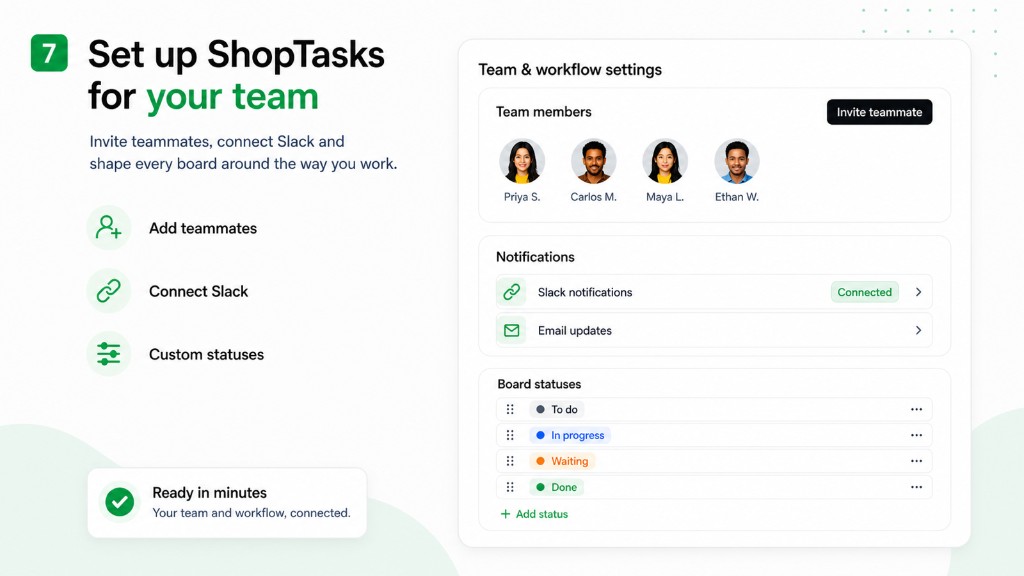
The order or customer is on the task. Email or Slack can notify them of the assignment.
- 4
Managers inspect what is still open
Unowned and overdue staff tasks are visible without a status meeting.
Staff member owns a review before going off shift
Trigger → conditions → ShopTasks task → assignee → completion
- When
A high-risk or tagged order needs review during the afternoon shift.
- If
Task created manually or by Flow.
- Then
Create ShopTasks task: Review order #1234 before 4pm fulfilment cut-off
Assigned to Alex on ops. If Alex is off, the manager reassigns from the board instead of hoping the Slack thread is read.
- Assign
Named staff member (Alex)
- Complete
Alex completes the review or the manager reassigns before the cut-off. The order is not left to 'the team'.
What this changes
-
Named owners on store work
Staff know what they owe today. Managers know who to ask.
-
Unlimited staff on the free plan
Warehouse, support, and office can all have assignments without a per-seat tax on the public plan.
-
Handoffs are reassignments
When someone is off, the task moves to another staff member with comments intact.
-
Shopify context stays with the person
They open the task and the order, not a spreadsheet row that drifted.
Who this is useful for
- Store managers assigning daily operational work to staff
- Ops leads who need overdue visibility by person
- Teams that currently assign work in Slack or verbally
- Merchants who searched for Shopify staff tasks rather than generic to-do apps
Flow can assign the staff member
When Flow creates a ShopTasks task, set the assignee to the staff role that always owns that exception — ops for high-risk, warehouse for packing tags. People still complete the work in ShopTasks.
Open the Shopify Flow workflow →
Install ShopTasks — Free“Great app! We were looking for an app to manage order workflow tasks across our staff and wanted something that integrated natively with Shopify on the backend. ShopTasks delivered and the level of customization was quite appealing.”
Free to install · Up to 500 active tasks · Unlimited staff & boards
Built specifically for Shopify · Shopify Flow integration
FAQ
How is this different from Shopify staff permissions?
Permissions control access. ShopTasks tracks assigned operational work — who must finish a review, a follow-up, or a packing step.
How is this different from team task management on this site?
The team page focuses on handoffs across roles. This page is for merchants searching for staff tasks: one person, one job, visible overdue work.
Are staff seats limited?
No. The free plan includes unlimited staff members and unlimited boards, with up to 500 active tasks.
Do staff get notified?
Yes. Email and Slack notifications can tell a staff member when work is assigned or overdue.