
Unfulfilled orders
Unfulfilled Shopify orders need a follow-up owner before they go stale.
ShopTasks turns aging or blocked unfulfilled orders into assigned follow-up tasks so someone contacts the customer, fixes the address, or unblocks fulfilment — instead of discovering the order days later.
Unfulfilled is a status. Follow-up is work.
Every store has unfulfilled orders that are not simply 'in the queue'. Some are waiting on a customer email. Some are missing a shipping method. Some sat through a weekend because the SKU was on backorder. Shopify will still list them as unfulfilled. Nobody is assigned to chase the blocker. Support finds out when the customer asks why nothing has shipped.
Assigned follow-up for orders that have not shipped
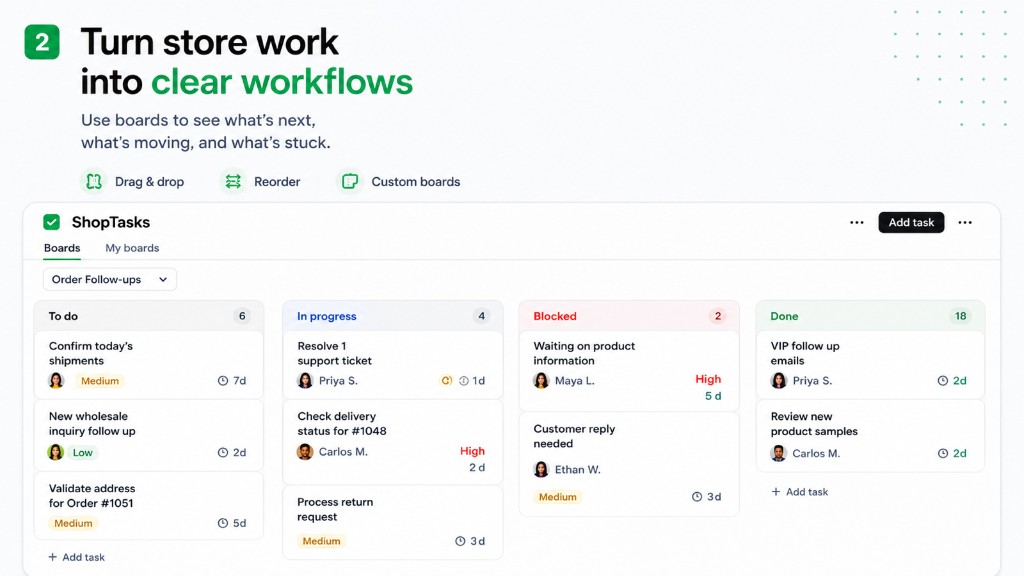
Create a ShopTasks task linked to the unfulfilled order, with a due date that matches how long you are willing to wait. The owner might be support (contact the customer) or warehouse (confirm stock). Shopify Flow can create that task when an order remains unfulfilled after a number of hours, or when a tag such as `waiting-on-customer` is applied. The follow-up is then work on a board, not a filter someone might open tomorrow.
Unfulfilled order follow-up
- 1
The order is still unfulfilled
It is blocked on information, stock, payment, or a customer reply — not merely waiting in a healthy queue.
- 2
Create a follow-up task on that order
Title it with the blocker: 'Customer address needed for order #1988' or 'Unfulfilled 24h — check stock for #1988'.
- 3
Assign the person who can unblock it
Support owns customer contact. Warehouse owns stock checks. Ops owns anything in between.
- 4
Close when fulfilment can proceed — or the order is cancelled
The task is done when the blocker is gone, not when someone glanced at the unfulfilled list.
Order still unfulfilled after 24 hours
Trigger → conditions → ShopTasks task → assignee → completion
- When
Order created (or a scheduled Flow check on unfulfilled orders)
- If
Fulfillment status is unfulfilled and the order is older than 24 hours, or tagged `waiting-on-customer`.
- Then
Create ShopTasks task: Follow up on unfulfilled order #1988
Confirm why it has not shipped. Contact the customer if information is missing. Assign warehouse if stock is the blocker.
- Assign
Support or operations
- Complete
Information collected or stock confirmed; fulfilment proceeds, or the order is cancelled with a recorded reason.
What this changes
-
Aging orders get a person
Unfulfilled lists stop being something you scan when you remember.
-
Customers are contacted on purpose
Waiting-on-customer is a task with a due date, not an informal hope.
-
Warehouse and support share the blocker
The same order-linked task can move between roles until fulfilment can start.
-
Flow can watch the clock
Create the follow-up when an order stays unfulfilled, instead of relying on a morning ritual.
Who this is useful for
- Stores with frequent missing-address or missing-info orders
- Support teams chasing customers who have not replied
- Ops leads who review unfulfilled aging every morning in a report
- Merchants using tags such as `waiting-on-customer` or `on-hold`
Shopify Flow for unfulfilled follow-up
Use Flow to create a ShopTasks task when an order remains unfulfilled or is tagged as waiting on the customer. The workflow page shows the trigger, conditions, and assignment pattern.
Open the Shopify Flow workflow →
Install ShopTasks — Free“Great app! We were looking for an app to manage order workflow tasks across our staff and wanted something that integrated natively with Shopify on the backend. ShopTasks delivered and the level of customization was quite appealing.”
Free to install · Up to 500 active tasks · Unlimited staff & boards
Built specifically for Shopify · Shopify Flow integration
FAQ
Should every unfulfilled order become a task?
No. Healthy queues do not need a task per order. Use ShopTasks for orders that are blocked, aging, or tagged as needing a person.
Can Flow create the follow-up after a delay?
Yes. A common pattern is: if the order is still unfulfilled after a set time, create a ShopTasks task for support or ops.
Does this replace a fulfilment report?
No. Reports show the list. ShopTasks assigns the specific orders that need human follow-up.
Is ShopTasks free?
Yes. Free to install, with up to 500 active tasks, unlimited staff, and unlimited boards.